The Future of Connected Homes: Smart Wiring and Data Cabling Trends

The modern home is no longer just a place to live, it’s a hub of technology.

From smart TVs and security systems to automated lighting and climate control, our daily lives are increasingly powered by connected devices. But behind every “smart” feature is a network that keeps it all running.

That’s where smart wiring and data cabling come in. These technologies form the backbone of connected homes, ensuring your devices don’t just work, but work together seamlessly. At Antenna Direct, we’re keeping a close eye on how homes are evolving, and here are some of the top trends shaping the future of connected living.


Smart Wiring as the New Standard

In the past, wiring was simply about getting power to your outlets and lights. Today, smart wiring integrates everything from entertainment and security systems to internet and home automation. Builders are increasingly including smart wiring as a standard in new homes, recognising that homeowners expect future-ready infrastructure.

Smart wiring is all about flexibility. It creates a central hub where data, phone, TV, and internet can be distributed to different rooms in your home, ready for whatever new devices or systems come along.


Rise of Structured Data Cabling

Wi-Fi will always play a role in our homes, but as the number of connected devices grows, structured data cabling is becoming essential. Having a wired backbone running through your home ensures speed, reliability, and stability for high-demand devices like smart TVs, gaming consoles, and home offices.

We’re seeing more homeowners request Cat6 or Cat7 cabling during renovations or builds, ensuring their homes are ready for high-speed internet and bandwidth-heavy applications such as 4K/8K streaming and cloud-based work.


Hybrid Networks: Wi-Fi + Data Cabling

The future of connected homes isn’t about choosing between Wi-Fi and cabling, it’s about combining them. Hybrid networks use wired connections for key devices and Wi-Fi for mobility, creating a balanced system that eliminates dropouts and dead zones.

With professional installation, data cabling can also help position Wi-Fi access points more effectively, ensuring you have strong coverage in every corner of your home.


Integration with Smart Home Devices

From Alexa and Google Home to security cameras and smart fridges, homes are filling with devices that rely on fast, stable connectivity. Smart wiring ensures these devices communicate seamlessly, without overloading your Wi-Fi.

We’re also seeing growth in smart energy management, where wiring and data cabling connect solar inverters, battery systems, and energy monitors, helping homeowners track and reduce their power usage.


Future-Proofing with Fibre and Beyond

As internet speeds continue to climb, the push toward fibre-ready homes is growing stronger. Installing structured cabling that can handle future upgrades means you won’t be left behind as faster services roll out.

Some homes are even preparing for 10-gigabit networking, ensuring they’re ready for decades of technological growth.


Why Professional Installation Matters

As homes become more connected, the complexity of networks grows. Poor cabling or DIY installations can create bottlenecks, dead zones, and frustrating downtime. At Antenna Direct, our team designs and installs smart wiring and data cabling systems that are safe, efficient, and future-proof so your home stays connected long into the future.


Final Thoughts

The connected home of the future isn’t a dream, it’s already here.

With smart wiring and structured data cabling, you can create a home that’s not just functional today, but ready for tomorrow’s technology.

If you’re building, renovating, or simply looking to upgrade your network, get in touch with Antenna Direct. We’ll help design a system that keeps your home smarter, faster, and more reliable than ever before.

Maximising Your Living Space: Creative TV Wall Mounting Ideas

Your television is often the centrepiece of your living room, but if it’s taking up valuable floor space on a bulky cabinet or entertainment unit, it may be time to rethink your setup. TV wall mounting not only looks sleek and modern, but it also creates more room, improves viewing angles, and enhances the overall style of your home.

At Antenna Direct, we specialise in professional TV wall mounting solutions that are safe, stylish, and tailored to your space. Here are some creative ways to maximise your living area with a professionally mounted TV.


Go Minimalist with a Floating Look

One of the biggest advantages of wall mounting is achieving a clean, clutter-free aesthetic. By mounting your TV directly on the wall, you instantly free up floor space and create a floating effect that’s perfect for minimalist or modern interiors. Pair this with concealed cabling for a crisp, showroom finish.


Create a Home Theatre Experience

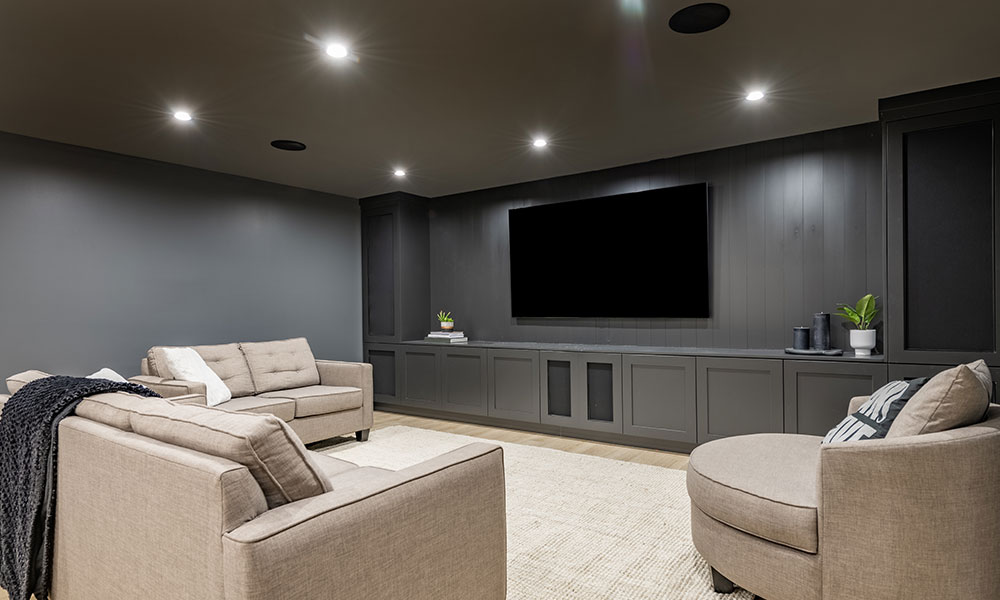
If you’re a movie lover, wall mounting your TV at the perfect height can completely transform your viewing experience. Combine it with surround sound speakers and smart lighting for a true cinema-at-home vibe. Add reclining chairs or a sectional sofa, and you’ll never want to go back to the cinema.


Mount Above the Fireplace

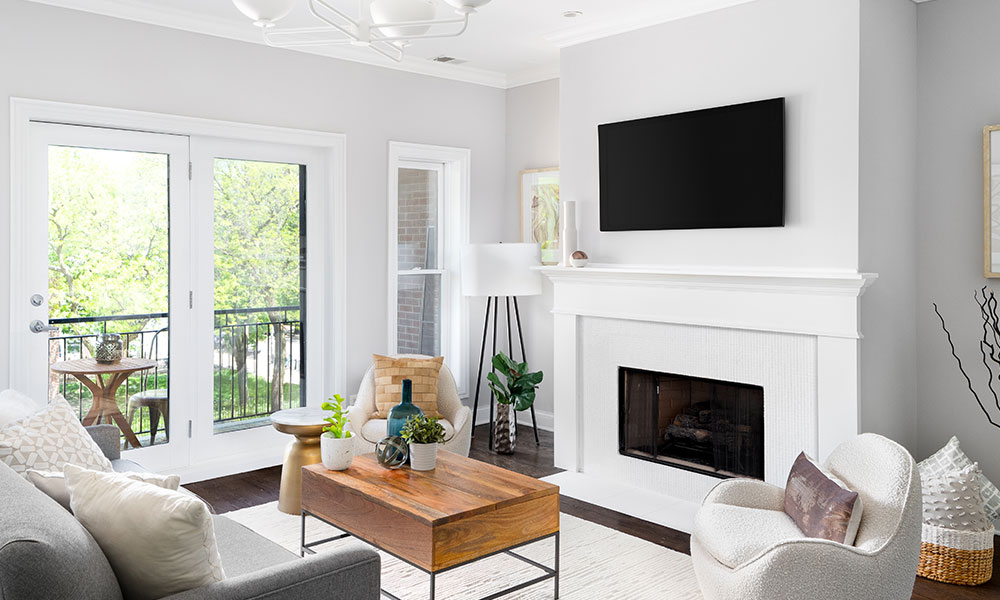
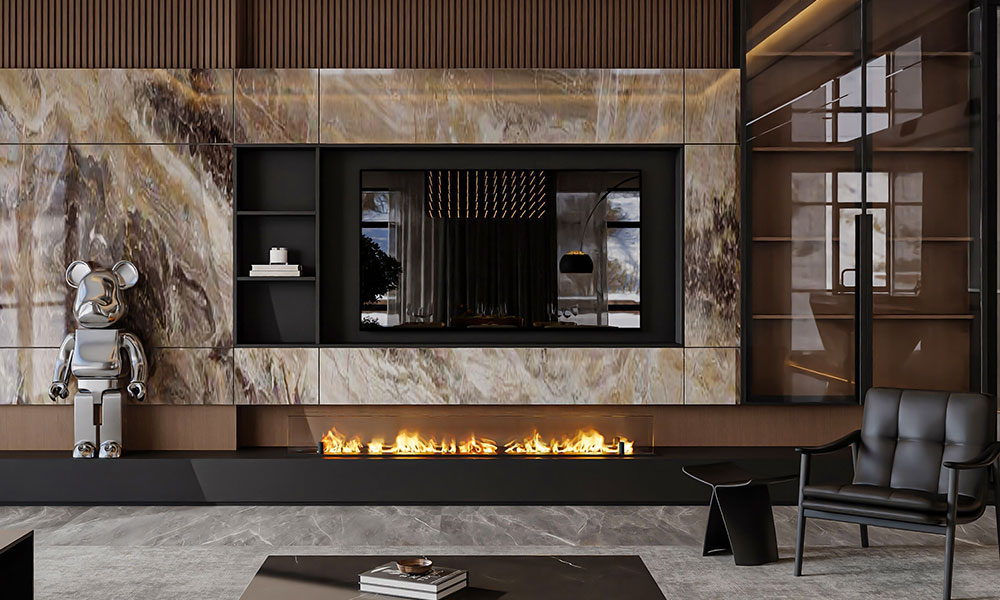
Mounting a TV above the fireplace is a popular option for homeowners who want to make the most of a central focal point. This setup works particularly well in open-plan living areas, drawing attention to both the fire and the screen. With the right mounting bracket and professional installation, you’ll have both style and safety covered.


Integrate with Custom Joinery

If you’ve got built-in shelving or cabinetry, your TV can become part of a seamless entertainment wall. A recessed wall mount can make your TV sit flush with the joinery, blending technology into your décor rather than letting it dominate the room.


Rotate or Tilt for Flexibility

Sometimes your living room isn’t designed around a single viewing spot. A swivel or tilt bracket allows you to rotate your TV toward different areas — whether you’re cooking in the kitchen, working from the dining table, or relaxing on the couch. This is perfect for multi-purpose spaces or open-plan layouts.


Mount in the Bedroom

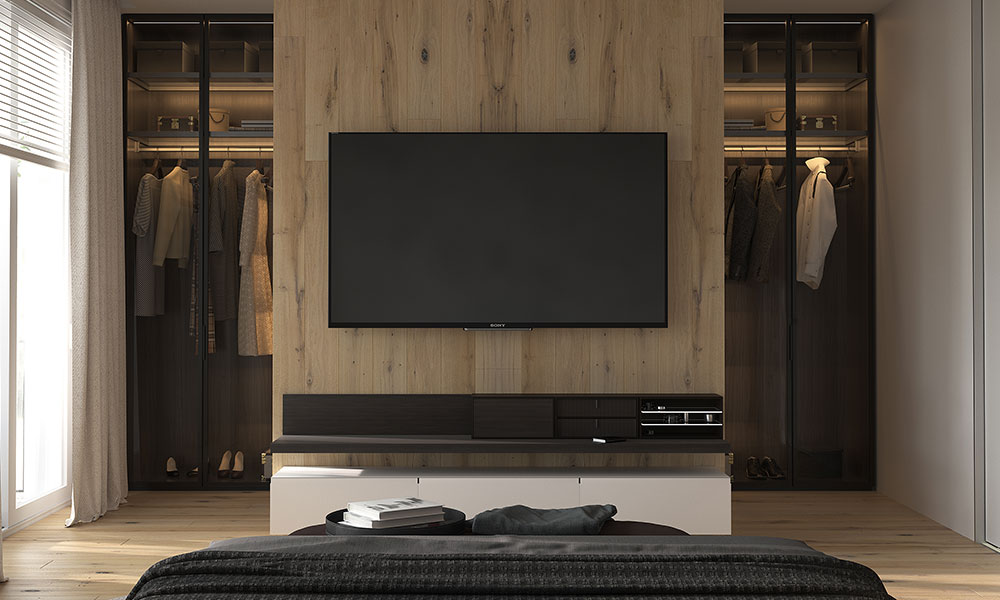
TV wall mounting isn’t just for living rooms. Mounting a TV in your bedroom saves precious space while giving you the luxury of winding down with your favourite shows. With a tilt mount, you can set the angle just right for comfortable viewing from bed.


Pair with Smart Wiring and Hidden Cabling

A wall-mounted TV looks best when the cords are out of sight. At Antenna Direct, we can integrate smart wiring and data cabling into your wall, concealing power and internet connections so your setup looks as good as it performs. This also keeps cords out of reach of kids and pets, making it safer.


Why Choose Professional TV Wall Mounting?

While DIY mounting kits are available, getting it wrong can lead to crooked screens, visible cables, or even damage to your wall or TV. Our team at Antenna Direct ensures:

  • Safe installation on any wall type.
  • Hidden cabling for a polished finish.
  • Perfect viewing angles for comfort.
  • Peace of mind knowing your TV is secure.

TV wall mounting is more than just a practical upgrade — it’s a chance to transform your living space into a stylish, functional area that suits your lifestyle. Whether you’re looking for a minimalist design, a home theatre setup, or a versatile swivel mount, Antenna Direct can make it happen.

Contact us today to find out how we can help bring your creative TV wall mounting ideas to life.

Data Cabling 101: Why Wi-Fi Alone Isn’t Enough for a Modern Home

When setting up internet in your home, most people rely on Wi-Fi as the go-to solution. It’s quick, convenient, and wireless — what’s not to love? But as our homes fill up with smart TVs, gaming consoles, security systems, and smart appliances, Wi-Fi alone often can’t keep up. That’s where data cabling comes in.

At Antenna Direct, we specialise in designing and installing structured data cabling systems that give you fast, reliable connectivity in every corner of your home. Here’s why data cabling is becoming essential in modern households.


The Problem with Wi-Fi

Wi-Fi has its limits. While it’s great for checking emails on the couch or browsing on your phone, it struggles when multiple devices compete for bandwidth. You’ve probably experienced:

  • Dropouts and buffering when streaming movies or TV shows.
  • Lag and frustration when gaming online.
  • Dead zones in certain rooms of the house.
  • Slowdowns during peak times when the whole family is connected.

These issues are caused by interference, distance from the router, and the simple fact that Wi-Fi was never designed to handle the demands of today’s connected homes on its own.


What Is Data Cabling?

Data cabling is the installation of physical cables (like Cat6 or Cat7 Ethernet) that create a structured network backbone for your home. Instead of relying purely on Wi-Fi, devices can connect directly through a wired system that guarantees speed and stability.

Think of it as giving your home a hardwired “superhighway” for internet traffic, while Wi-Fi acts as the side roads for mobile and casual use.


Benefits of Data Cabling in Modern Homes

1. Faster Internet Speeds

A wired connection delivers speeds that Wi-Fi simply can’t match, making it perfect for streaming 4K/8K content, video conferencing, and heavy downloads.

2. Reliability & Stability

Unlike Wi-Fi, data cabling isn’t affected by walls, appliances, or interference. This means consistent performance without dropouts.

3. Better Gaming Experience

Gamers know that milliseconds matter. A cabled connection eliminates lag, providing the stability needed for online gaming.

4. Supports Multiple Devices

With more smart devices in homes than ever before, data cabling ensures everything from your security cameras to smart fridges can run smoothly without slowing down your network.

5. Future-Proofing Your Home

As internet speeds and smart technology continue to advance, having data cabling in place means your home will be ready to handle whatever comes next.


Where Data Cabling Makes the Biggest Impact

  • Home theatres – Stream movies in crystal-clear 4K or 8K without buffering.
  • Home offices – Reliable video calls and uploads for remote work.
  • Gaming setups – Zero lag and faster response times.
  • Smart homes – Ensure your lighting, appliances, and security systems all connect seamlessly.

Combining Wi-Fi and Data Cabling

The truth is, you don’t have to choose between Wi-Fi and data cabling — the best setup uses both. Data cabling provides a solid backbone, while Wi-Fi offers mobility. Together, they create a balanced, efficient home network.


Why Choose Antenna Direct for Data Cabling?

At Antenna Direct, we don’t just install cables — we design a network that suits the way you live. Whether you’re building a new home or upgrading your current one, our team ensures:

  • Professional installation with neat, discreet cabling.
  • Tailored solutions for your entertainment, office, and smart devices.
  • Future-ready systems that grow with your technology needs.

Wi-Fi is great for convenience, but it shouldn’t be the backbone of your home network. For speed, reliability, and long-term performance, data cabling is the key to unlocking a truly connected home.

If you’re ready to upgrade your home with professional data cabling, get in touch with Antenna Direct today.

Digital TV Info

Digital TV has been around since 2001. Bringing benefits such as perfect picture quality even with average signal levels, high definition streaming, 5.1 surround sound support and program guide, it’s a step up from the TV reception of days gone by – these benefits were simply not achievable with analog TV streams.

The Year 2013 introduced the end of an era for analog TV for Perth; as of April 16 all analog transmissions in the Perth area were switched off. Analog TVs without the aid of a set top box were not able to display TV Channels anymore, leaving viewers with the choice of using their existing analog TV with a set top box, or using a newer Digital TV.

At Antenna Direct, we’ve found that a lot of people have questions regarding this change. Here, we seek to offer a little clarity. From information on digital TV antenna installation costs, through to advice regarding equipment needed to receive a digital signal, we’re here to help the people of Perth.

How is Digital TV Different to Analog?

In an analog transmission stream, the video is transmitted directly in the stream and is subject to degradation due to interference and noise, which even small amounts are visible in the picture quality. As the signal quality lowers due to noise and interference, the picture quality reflects this with reduced clarity, lines and “snow”. The picture however does not pause and is constantly visible and audio is still heard even with low signal levels.

In a digital transmission stream, packets of data are transmitted which contain information that is decoded by the TV and produced into a picture. The digital stream contains bits of data that compose the picture we see, as well as error correction bits, which help maintain the integrity of the stream when the signal quality is reduced due to noise and interference.

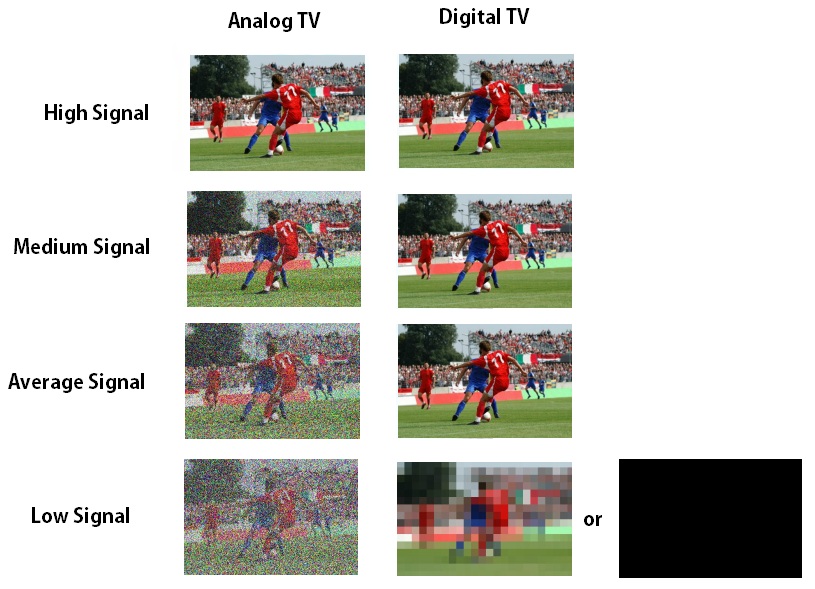
Digital TV decoders contain advanced error correction algorithms, which are able to reconstruct degraded streams in order to maintain perfect picture quality even at low signal levels, a feat that is impossible with analog TV. As a result, a digital TV picture remains crystal clear as the signal quality decreases, however when the signal quality drops beyond the point of the ability of the error correction algorithm to reconstruct the stream, the picture quality will begin to glitch, pause or drop out totally to a black screen.

Digital TV picture quality often remains perfect with lower signals until the point of failure is reached.

Example :

The above image shows how digital TV picture will react to varying signal quality, while your picture may be perfect most of the time even with borderline acceptable signal level, any slight decrease in signal can cause freeze ups or glitching while watching your favourite programs. For this reason, it’s best practice to ensure the antenna, cabling and all related equipment is in good condition and up to date to maximize signal quality, giving a decent margin to the failure point, for reliable TV reception.

We can now see that with today’s large flat panel displays, digital TV is favourable as it gives perfect picture quality even in lower signal areas so that the majority of suburbs can experience a perfect picture given the signal is at an acceptable level.

Combined with HD Support, Program Guide and Surround Sound, Digital TV makes the most of Todays technology and Home theatre equipment.

What sort of TV or Equipment do I require to view digital TV?

Where an old analog TV is used, a digital set top box is required in order to receive digital signals and display them on an analog TV. This is a relatively cheap solution and allows you to keep your old TV.

New TVs that have digital tuners do not require a set top box, and can receive digital signals directly. Upgrading an analog TV to a new digital TV removes the requirement for a digital set top box.

Depending on signal level and quality achieved, a Digital Antenna may be required.

What is a “Digital TV Antenna” Do I need One?

Digital channels occupy a different bandwidth than the analog channels did. Digital TV antennas have elements that are tuned specifically to the frequency band currently occupied by digital channels and as a result, can produce better signal quality than previous designs. Many older antennas may not even cover the entire frequency range required for digital channels, resulting in poor signal quality.

Older antennas may also be heavily corroded and damaged. This will affect signal quality, increasing the chance of picture freeze ups and glitching.

Poor TV Reception is not always a fault of the antenna alone, as there may be underlying problems such as faulty cabling,

location of the antenna, Alignment, TV tuner, amps and connections which require being properly diagnosed.

Digital TV antenna prices vary depending on the quality required. Problem areas may need a higher gain antenna, and this usually means that the TV antenna installation cost will be a little higher.

What is a “HD” or “HDTV” Antenna

There is no such thing, it’s a marketing term. All digital TV antennas can receive HD channels.

Which Antenna is the Best for my Area

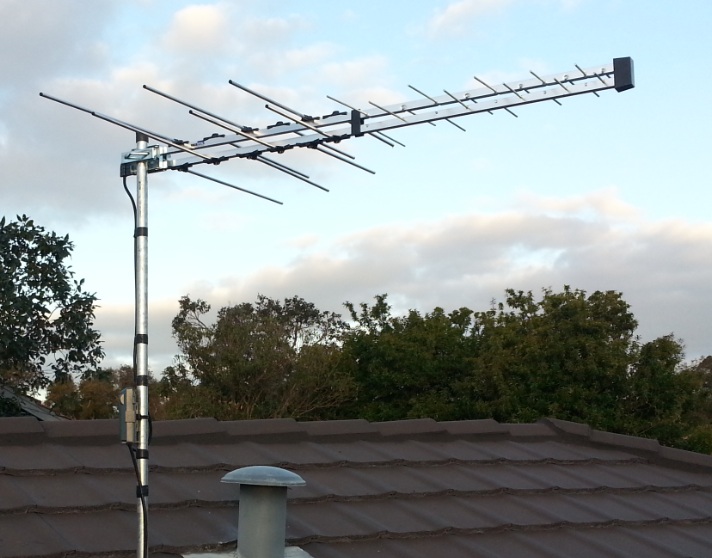
For most suburbs around the Perth metro area, the best-suited antenna is the Log Periodic Type, which features a compact design for a nice appearance and good performer. Certain suburbs, however, may be problematic and will benefit from a higher gain antenna.

Log Type Antenna

We carry many different brands and designs to suit different areas from Metro to Country. In problematic areas, there is no one size fits all solution as every area is different, the best performing antenna is chosen for the specific site.

Can my Antenna be relocated or Hidden?

For various reasons, mainly visual, you may want your antenna relocated. This is possible however depending on your area a relocation to a lower point on the roof may yield lower signal level compared to a higher point, this all depends on the individual location. For tile roofs, modern compact antennas are available that can be installed discretely inside the roof space for a low visual impact and to minimise any weather damage. In-roof mounted models will not work under tin roofs.

Again, the digital antenna installation cost will vary depending on the model you choose.

We carry a wide range of high gain antennas and amplifiers suited for country areas to maximise the signal strength. With a proper site analysis and combination of equipment acceptable signal can be achieved in problematic areas.

In areas where an antenna system is not able to provide acceptable reception, satellite TV can be installed to receive all the regular channels (7 / 9 / 10 / ABC / SBS) from the recently established VAST network. Utilising a small satellite dish and set top box, quality TV reception is guaranteed in every remote country suburb and town.

What are Options for Foxtel Reception in Extra Rooms?

There are various options for viewing Foxtel in extra rooms:

– 1. Extra Foxtel Outlet – An Extra Foxtel wallpoint is installed, allowing an extra Foxtel box to be plugged in providing all features of Foxtel and IQ Functions.

– 2. HDMI Outlet – An HDMI Outlet is installed in the room of choice, allowing the currently viewed Foxtel channel on the box to be available in another room with most modern TV’s that have HDMI connections.

– 3. Modulation – Digital or Analog modulator is installed, injecting a signal into the TV Antenna System. Every room in the house that has a TV outlet automatically receives an extra channel that has the current Foxtel program being viewed.

Can you give me 10 Year Warranty on my Antenna?

There is currently a popular trend of years or even longer warranties with antenna installations, often coupled with an overt and captivating sales pitch in order to give an “edge” over competing business.

– No antenna manufacturer or wholesaler in Australia offers a warranty policy of 10 years on their products, therefore this sort of warranty cannot be passed down to the customer.  As a premium provider, we do not support or engage in deceptive and unethical ways of obtaining business.

We look after our customers by offering a decent, yet sensible warranty period. All parts and labour are covered by a 3 year warranty. We carry a high-quality range of antennas which are designed to last a long period of time and only use the best work practices to ensure a reliable installation over the years.  The reliability of our products have been proven with many installations from as early as 1994 still in service.

Would you like to know more about digital TV antennas and installation prices in Perth? Please contact us today – we can provide you with an obligation free quote.

Why is my TV picture blurry?

A blurry TV picture often is almost the result of a low bitrate and resolution being used on too large of a TV that it is being viewed on. One example is viewing a standard definition channel on a TV that has a larger screen size than 32″.  Another example is sitting too close to a 75″ TV.  If sudden movements in picture such as a football being kicked around, or a fast movement of a person make the edges distort then this is almost always a low bitrate issue, that is the amount of data used to transmit the stream from the broadcast tower to the receiving antenna.  9Rush is a channel that has the lowest picture quality due to it’s bitrate.  More information on why a TV picture is blurry can be found on this blog post.

Polk Boom Bit Battery Replacement

The Polk Boom Bit is the first wearable Bluetooth speaker to be introduced, allowing you to make calls and listen to music all while having this little speaker clipped to your shirt.  As an antenna man in Perth who is often out on a roof, inside a ceiling or driving from job to job I need to be able to have a reliable speaker I can wear on the go.  Traditional headsets or an ear piece just doesn’t work which can easily get knocked out when using earmuffs or moving around a lot.

One issue with the Polk Boom Bit I ran into was that over the years, the battery life had degraded so badly that I could only get 20 minutes of standby time until the speaker would turn off.  I couldn’t find any repair guide on the internet on how to replace the battery on the Boom Bit so I decided to figure out how it was put together, and document the procedure.  So let’s get right into it.

Separate the board from the shell

The first thing is to identify how the circuit board and internals are attached to the case and where the battery is located.

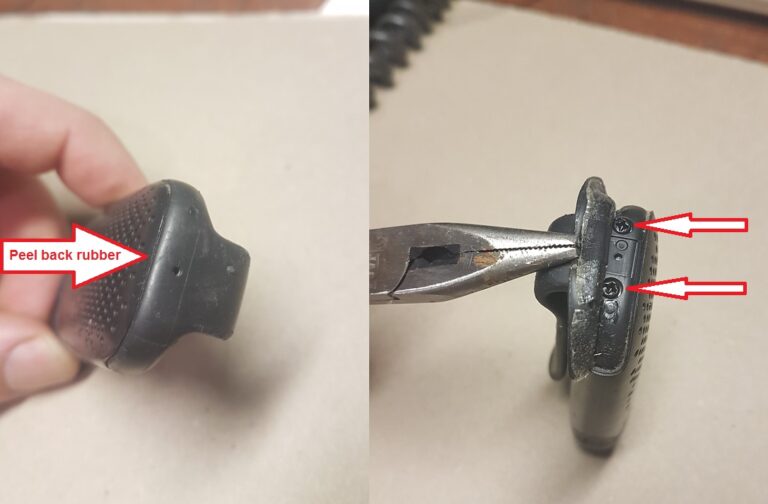
Peel back the rubber section right at the top where the speaker vent holes begin, by prying very gently, starting at the middle.  Peel back just enough to reveal the two Phillips head screws.  While still holding the material back with one hand, use a precision Phillips screwdriver to undo both screws.

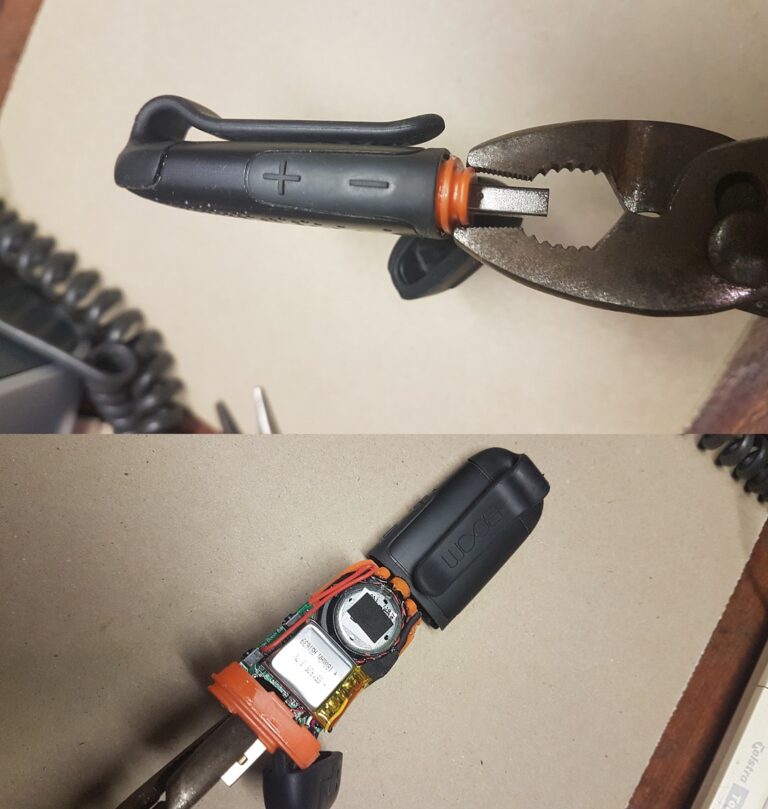
This is all that holds the board to the case, it can now slide out.  Pop open the USB connector cap and using a set of pliers grip the centre of the orange plastic section, being careful to not touch the USB connector at all or damage it.  Hold the shell firmly in one hand, and with a very firm grip on the pliers to avoid slippage, pull straight out.  The entire assembly should come out as one piece.

Do take care as not to damage the speaker, which can be accidentally impacted when pushing or holding the assembly during battery replacement.  At this point you may like to take the opportunity to gently clean debris and dirt from the speaker if required.

What type of battery does the Polk Boom Bit use?

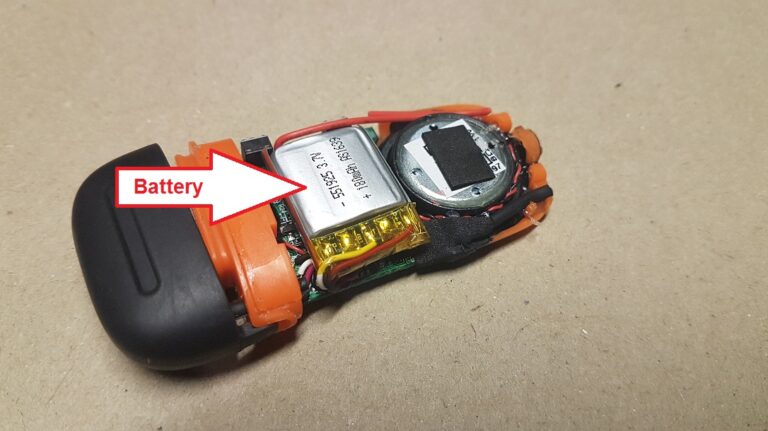
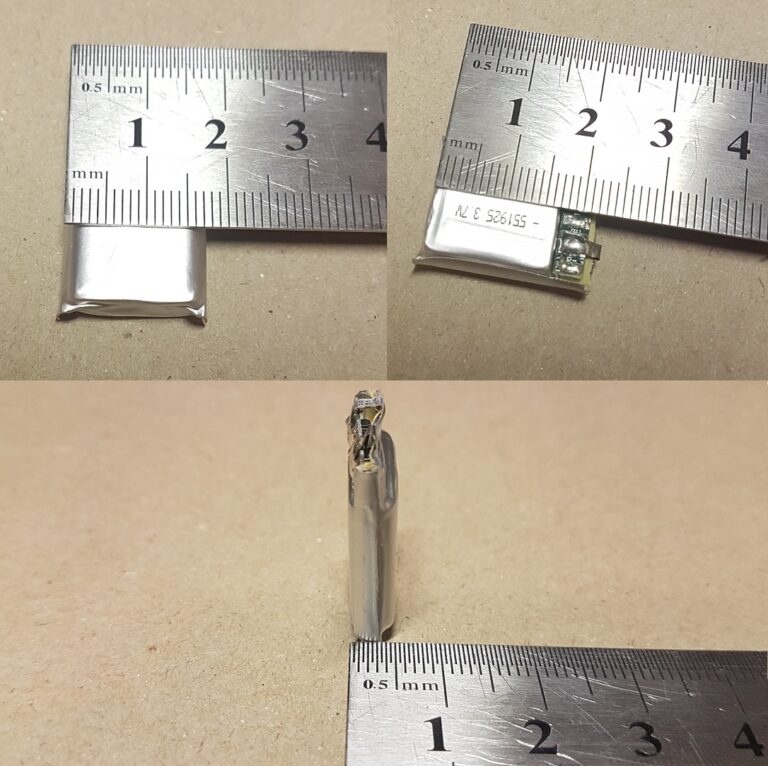
The battery is a 3.7v, 180mAh lithium polymer (LiPo), measuring 22 x 16.5 x 5mm.

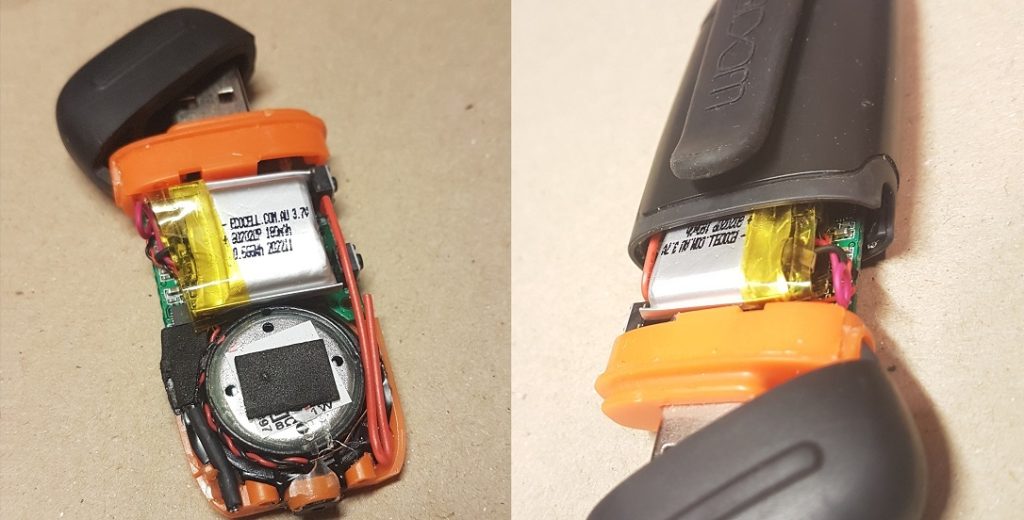
You may not be able to find the exact dimensions for the replacement, however from the picture we can see it’s a fairly snug fit, however there may be room to go up 1 or possibly 2mm on one of the dimensions, without fouling on the shell or having enough room for the wires to remain beside the battery.  I used a 602020 battery from Ecocell.

Given the Bit Boom has somewhat of a reputation of sub-par battery life when used at higher volume for continuous listening, you may consider trying to find the highest capacity battery that will fit.  For other purposes such as use as a wireless phone speaker, the factory 180mAh battery suffices.

Soldering in the new battery

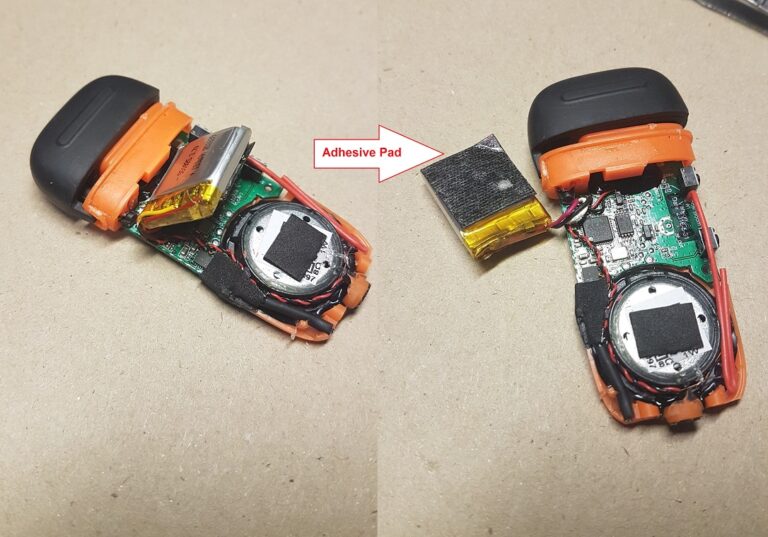
Gently pull the existing battery upwards, it is held onto the board by a double sided adhesive pad, be very careful not to rip the wires off the board, as they are quite a short length so caution must be taken.

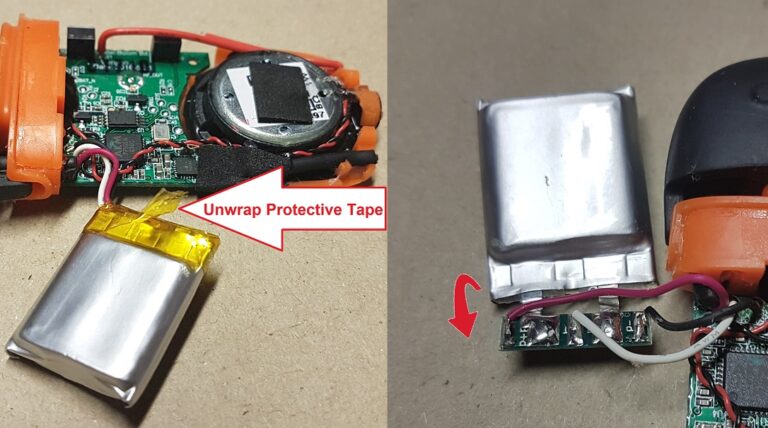
Unwrap the protective tape to reveal the circuit board of the old battery, where the solder joints for the positive and negative wires are.

Fold the circuit board out of the recces that it sits in the battery, so you may access the solder joints.

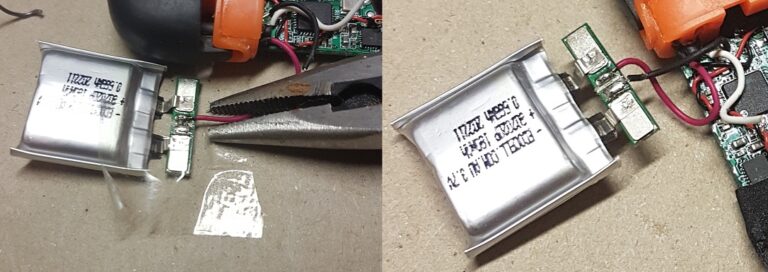
De solder the existing wires from the old battery.  Red is positive and black is negative, the white wire is a thermistor that some Lithium Polymer batteries have.  If your new battery does not use the white wire, you can leave the white wire unconnected however be sure to tape the end as not to cause a short circuit

When soldering a lithium polymer battery, a few precautions need to be taken.  As the positive and negative contacts on the new battery are very close, extreme care must be taken to not short circuit these contacts during soldering as battery damage will occur.  You may place some tape over one contact while soldering the opposite contact to avoid a short circuit.  Only an extremely short and soft touch with the soldering iron is required to melt the wire onto the contact.  You can use a small pair of pliers to hold the wire onto the contact while you solder it.  It is also important not to accidentally short out the positive or negative terminal of the wire contact at the circuit board, directly to the terminals of the battery, as this will bypass the charging protection circuitry.

For a less experienced DIY guy, this method carries a high risk of error, and an easier alternative method is to cut and solder the existing wires from the new battery to the wires that went to the old battery.  A fine knife can be used to very gently cut the skin of the wire as it is the core is extremely thin and fragile.

De solder the existing wires from the old battery.  Red is positive and black is negative, the white wire is a thermistor that some Lithium Polymer batteries have.  If your new battery does not use the white wire, you can leave the white wire unconnected however be sure to tape the end as not to cause a short circuit

When soldering a lithium polymer battery, a few precautions need to be taken.  As the positive and negative contacts on the new battery are very close, extreme care must be taken to not short circuit these contacts during soldering as battery damage will occur.  You may place some tape over one contact while soldering the opposite contact to avoid a short circuit.  Only an extremely short and soft touch with the soldering iron is required to melt the wire onto the contact.  You can use a small pair of pliers to hold the wire onto the contact while you solder it.  It is also important not to accidentally short out the positive or negative terminal of the wire contact at the circuit board, directly to the terminals of the battery, as this will bypass the charging protection circuitry.

For a less experienced DIY guy, this method carries a high risk of error, and an easier alternative method is to cut and solder the existing wires from the new battery to the wires that went to the old battery.  A fine knife can be used to very gently cut the skin of the wire as it is the core is extremely thin and fragile

Your Polk Bit Boom is now ready to use.

Why is my TV picture Blurry?

You may often have noticed that some TV channels appear blurry, causing concern as to whether a blurry picture is caused by a TV antenna fault or weak signal. What I can say is that through many years of being an antenna man in Perth, that this concern is becoming increasingly common in recent times.  When customers use our TV wall mounting service, sometimes this is often a subject of concern which we need to explain

When the customer mentions “Why is my TV picture is blurry”, it’s most commonly reported as lack of sharpness around the edges of details, such as the edge of faces, or objects on the picture, and also during times of high picture movement such as when watching the footy when the ball is kicked and the camera pans from one area to another.  It’s quite concerning especially when the display stands at Harvey Norman, JB Hifi and the Good Guys always use the best quality sample videos on the TV you are buying, which simply is not available in most free to air channels that you will watch when you bring that TV home.

You may be asking yourself the Question: what causes a blurry TV picture or TV channels?  – Answer:  A standard definition channel being watched on a TV size that is too big for the room. It’s basically a low quality picture being stretched out on a large display which many people often sit too close to.

Left – Blurry TV picture, not caused by a weak signal or TV antenna issue
Right – Large, sharp, well defined squares, indication of weak signal

Most standard definition channels are broadcast in 576i, this resolution was never designed to be used for TV’s larger than say, 32 inches as that was the most common size TV back in the 90’s and early 2000s. In past times large plasma TVs were very expensive and it was rare for a household to have such large displays. With new LCD, LED and OLED displays becoming much more affordable in recent years, 65 inch TV’s and even larger often in small living rooms is now the norm for most households. The most suitable resolution to produce a sharp picture on these displays is 1080i/1080p (1920 x 1020). Most channels being broadcast in Perth and throughout Australia are still standard definition (576i).

Try this – go to channel 10 while the news is on, watch it for a little bit, and then switch to 10 HD and watch that for a bit.  Switch back and forth between 10 and 10 HD and see what you notice. You will soon come to realize that your TV is too large for how far you are sitting from it, or that you are expecting too much from a standard definition channel for your size TV

So what causes blurry TV channels?  Answer: You have too large of a TV for you room or the channels you are viewing are not high enough in definition for your TV size.

This brings us to the question of – Is a blurry TV channel picture caused by a bad TV antenna or a weak signal?
The answer is no, with digital TV a weak signal does not cause a blurry picture, but rather large, uniform sized and easily noticeable squares, often accompanied by sound disruptions or squeaking in the audio.

The conclusion is, if you’re experiencing a blurry picture on a standard definition channel and you have quite a large display, it’s most likely an unsuitable picture resolution for your TV and unlikely a TV antenna or signal problem.

Starlink – What You need to know

Starlink is a network of over 2000 low orbiting satellites around the earth that provide internet access via the use of a satellite dish pointing to the Satellite.  In 4 years an American company has inadvertently made the troubled Australian NBN network obsolete in many rural areas, offering residents a solution to their internet connectivity needs they likely would otherwise never have.  Especially Starlink will benefit mining and exploration companies, being a game-changer for remote site communications.  As more residents in Perth both suburban and rural are now taking up Starlink internet connectivity there is quite a few considerations that need to be taken and things you need to know.

Will Starlink work in my area?

To be able to physically access the Starlink network there is two criteria :

1. Your city and suburb has coverage by Starlink satellites, you can check here – www.starlink.com/map

2. You have enough visibility to the area of the sky that the satellites orbit around, they constantly move and the dish tracks to them, download the app “Starlink” and use the “scan for obstructions” feature, then scan the sky

Even the smallest of obstructions can account for noticeable decrease in speed during the period of the day when the dish requires to point itself in the obstructed direction.
Minimizing any potential obstruction is very important.

Starlink is a network of over 2000 low orbiting satellites around the earth that provide internet access via the use of a satellite dish pointing to the Satellite.  In 4 years an American company has inadvertently made the troubled Australian NBN network obsolete in many rural areas, offering residents a solution to their internet connectivity needs they likely would otherwise never have.  Especially Starlink will benefit mining and exploration companies, being a game-changer for remote site communications.  As more residents in Perth both suburban and rural are now taking up Starlink internet connectivity there is quite a few considerations that need to be taken and things you need to know.

Will Starlink work in my area?

To be able to physically access the Starlink network there is two criteria :

1. Your city and suburb has coverage by Starlink satellites, you can check here – www.starlink.com/map

2. You have enough visibility to the area of the sky that the satellites orbit around, they constantly move and the dish tracks to them, download the app “Starlink” and use the “scan for obstructions” feature, then scan the sky

Even the smallest of obstructions can account for noticeable decrease in speed during the period of the day when the dish requires to point itself in the obstructed direction.
Minimizing any potential obstruction is very important.

The Starlink Cable

Starlink dishes are connected by a propriety cable that carries both data and power to/from the Starlink dish.  It differs to regular CAT6 cables in that it has it’s own style of connectors. They can be quite fragile, especially when pulling up cavity walls and pushing down conduits.  The standard Starlink cable length is 22.9 meters (75 feet).  This is generally long enough for most houses, however an optional 50 meter (150 foot) cable is available.  As a general guide a home longer than 20 meters with a high pitch roof, is pushing the limits of the shorter cable.

The smaller end (dish side) of the Starlink able head has a maximum diameter of 15.24mm.  Consideration should be taken if it ever needs to fit down a certain conduit on a single brick wall for example or any external ducting.  While the ends are a propriety design, the cable itself internally is a shielded CAT6 cable.  The cable sheath denotes it’s suitability for outdoor use.  The somewhat loose fitting connector at the dish doesn’t quite inspire confidence, yet it’s recessed deep inside the dish pole which is beneficial for shielding against rain.  It’s questionable weather salt spray in windy coastal areas can eventually work it’s way past the seal.

Cost and Power Consumption

Service costs vary and are available on the Starlink website, depending on whether it is a residential or business plan.  As of October 2022, monthly charges are $139 with hardware cost of $924.
This cost varies so a good idea is always to check on the Starlink website.

What is important to consider in the cost is that the dish consumes about 20-40 watts during idle conditions, and upto 110 watts during heavy use.  Depending on how often during the day internet is used, this may equate to a $10-$30 a month in electricity use.  In Australia, 240V AC power is used, no DC powering option is available currently.

How long is the warranty? What happens if something fails?

Starlink equipment comes with a 12 month warranty, thereafter it is the customers responsibility to buy any replacement equipment.  Power surges can also effect both the router and dish, at this point one may begin thinking about UPS and surge protectors.  As Space-X is a USA based company, unlike your local internet service provider, no such tech support staff are available to do site visits.  However basic common sense troubleshooting in many cases is enough to identify a fault or by the use of a local independent IT or Comms technician.  The Starlink router and app have inbuilt troubleshooting algorithms built in allowing faults to be detected remotely.  Limited official technical documentation for professionals is available currently, which would be greatly beneficial for troubleshooting onsite in the field as the uptake of Starlink ramps up.

As of October 2022, all support from Starlink to customer is done via a support ticket, phone support is not available.

Is Starlink good for gaming?

Online gaming often not only requires a decently fast internet connection and a latency below 100ms, however latency and consistently of latency or jitter, is most important.  On fast action first person shooter games, a jitter of 20 milliseconds of latency at a critical time could be the difference between your “shoot” click, registering before or after the target on the other side of Australia or an overseas server has actually moved away from your crosshair.  Actual reported experience has been mixed, with certain users reporting they feel little or intermittent problems in their gaming.  Racing or role playing games may not be of any issue, however Starlink may not be the best option for competitive first person shooter gaming if fibre-to-the-premises or better alternatives are available in your area.

Does Starlink interfere with TV reception

To date, very few reports of interference from Starlink dishes when installed appropriately, it’s mostly considered a non issue.  It’s always a good idea to ensure the Starlink dish is installed in such a manner and position, that in any alignment state it’s radiation pattern will not beam toward the TV antenna or it’s signal path.  It’s important to understand that Starlink is often installed in rural areas, some where the existing free-to-air signal strength and quality, while clear and watchable is already near the point of failure.  Any minor changes such as putting an extra device up on the roof may be enough to effect an already heavily compromised signal.  Best practice is required and the use of a field strength meter to test FTA signal quality before and after incase this is a potential concern.  A good condition digital antenna will maximize the preferential signal strength while minimizing chances of interference, as is use of an LTE filter.

A recent test we did in Wellard involved a new digital TV antenna held 50cm away from the Starlink dish, while doing repeated speed tests to simulate the highest throughput possible.  No uncorrected errors or picture break up was picked up on the signal meter at all and no degradation of the signal quality reading was present.  However once the TV antenna was placed directly in the line of sight of the Starlink dish, a strong high quality signal degraded quickly.  What we can conclude from these tests are that the only scenario which we may expect interference is of TV antennas mounted on tall 5+ meter masts which may at some point of the day become in the line of sight of the radiation pattern of the Starlink dish

Can I take the Starlink dish with me?

Starlink dishes on residential plans are geofenced by default, meaning the dish is configured only to work if used at the registered address.  Taking the Starlink dish with you such as on a camping trip would result in the denial of service.  Essentially the reason is to allow each satellite around the world to serve a finite amount of customers as a quality of service measure.  In 2022 Starlink introduced the portability option, which is accessible under “Add Portability” on your account page for an additional fee charged monthly.  No extra equipment is required.  You can disable portability once you return from your trip.  Speeds during use away from your registered address may be slower.

Removing the dish – an important consideration to take is whether your roof mount for your home allows for quick-disconnect and removal of the dish.  As such a pole adapter is required to be purchased separately.  Starlinks pole adapter is somewhat of a low quality, flimsy piece and aftermarket billet aluminum adapters are of a much better quality and appearance

In motion use is prohibited for the standard dish.  Starlinks terms of service specifically mention that use of the service is prohibited while the standard dish is physically moving, e.g while mounted to the roof of a caravan or campervan, while it is in motion.

The newly released high performance dish, which is larger in dimensions is designed and allowed for in-motion use.

What is the difference between Starlink and Starlink Roam / RV ?

Starlink Roam (Formally Starlink RV), by default uses the same equipment as the standard Starlink plan, with a few differences in the plan and service

1. Portability option is permanently enabled, meaning you can travel anywhere and use the service anywhere
2. You can pause your service when you don’t want to use it, to save money.
3. Starlink RV users are on a lower priority, meaning in times where the network has high use and demand, RV customers may receive lower speeds

Is the Starlink router password protected?

No.  By default no password is set and the router is an open unsecured hotspot, anyone nearby can connect to your Starlink router.  It is recommended to set a strong password.

Does Starlink have a Static or Dynamic IP Address?

Residential plans have a dynamic IP address.  Business plans have the option for a static IP address.  A useful check to carry out is to contact your existing service provider and ask them to tell you whether you are on a dynamic or static IP address

Perth TV Transmitter Sites and Locations

All TV antennas in Perth receive their signal from a transmission antenna.  These can be located on a tower, or a building and are generally at the highest possible elevation in order for the signal to be radiated effectively across the intended coverage suburbs.  Site locations, licences, and special conditions are regulated by ACMA.  Operators responsible for running and maintaining the transmission equipment and antennas are TX Australia, Swan Broadcasting and Broadcast Australia.  With introduction of television in Perth in 1959, the original transmission site was and is still located in Bickley on Television road, broadcasting Channel 7 (TVW).

Shortly after in 1960, ABC (ABW) began broadcasting from a nearby tower on television road, which also broadcasts SBS beginning in 1986
Nine Network (STW) beginning in 1965 from a site in Walliston on Lawnbrook Road
Network Ten (NEW) beginning in 1988 are transmitted from a tower in Carmel on Welshpool road

List of frequencies from Bickley/Carmel site

Service NameFrequency (mhz)RF ChannelPolarization
Seven Network177.56Horizontal
SBS184.57Horizontal
Nine Network191.58Horizontal
Network Ten219.511Horizontal
ABC226.512Horizontal

FM and DAB+ services for digital radio are also transmitted from these sites along with mobile services

While all four sites physically use a different tower in independent locations, they are within 1km of each other, and generally known among the trade as the “Bickley” site.
Most of the TV antennas you see on roofs that appear to point to the hills, are receiving their signal from the towers in this site.  With an ERP (Effective Radiated Power) of 82kw, a lot of power is used to transmit the signal throughout the Perth metro area, giving good coverage even to the furthest and newest established suburbs past Alkimos.  A direct line of site can result in perfect reception even upto 200km away, this is in most situations not the case

To alleviate terminal reception problems in certain black spots around the Perth area, re transmission sites have been introduced over the years to transmit the same channels on different frequencies in order to avoid SFN related interference with main transmitters.   The introduction of these sites allow antenna installers alternative sources of receiving a signal.

Scarborough

Introduced in 2013 during the digital switchover, this transmitter is located on top of the Rendezvous hotel, formerly known as Observation City.  The purpose of it’s introduction was to provide a solution to terminal TV reception problems in various areas of Scarborough.  With a very modest low ERP of just 164 watts, coverage was only intended for the suburb of Scarborough.  We have been able to successfully pick up signals and achieve a lock on all channels as far as Padbury.  Due to the transmitter generally having good line of site along the coast, many properties around Trigg, North Beach, and Cottesloe can receive transmissions with the correct antenna, tuning and amplification.  Trouble spots as far as inner Suburbs of Nollamara can receive a perfect signal too due to good line of site.

List of frequencies for Scarborough site

Service NameFrequency (Mhz)RF ChannelPolarization
Seven Network655.546Horizontal
Nine Network662.547Horizontal
Network Ten669.548Horizontal
ABC676.549Horizontal
SBS683.550Horizontal

Perth City

Introduced in 2013, the Perth City transmitter is located atop of the Bankwest tower on St Georges Terrace.  The unique advantage of a 247 meter height above ground level and a very central location to all suburbs and and unidirectional dispersion of signal gives very good coverage to many areas.  Certain isolated black spots in suburbs close to the metro area can make use of this transmitter around Victoria Park and Burswood where the main Bickley tower is blocked by large apartment buildings.  We have been able to pick this transmitter up as far as from trouble areas like Clifton Hills in Kelmscott, and similar areas in Kalamunda and Gooseberry Hill where there is direct line of site.

Channels and frequencies are the same as Scarborough.

Roleystone

The Roleystone tower is located on Canns Rd, commencing transmissions in 2004 from Seven Network, Nine Network, and SBS and later expanding to inlude ABC and Network Ten.
The coverage of this tower primarily was intended for the suburb of Roleystone, which has many black spot areas where signal from the Bickley/Carmel tower are very weak despite physically being located very close.

Surrounding suburbs and areas can pickup transmission from this tower, notably the Clifton Hills area in Kelmscott.  We have noticed residual signal can be received from as far as south of the river suburbs such as Willeton.  Manual tuning may be required to filter out non preferential frequencies.

Transmissions originally began on the higher end of the UHF spectrum and during the restack moved to lower frequencies.  As such many legacy antennas installed in the early 2000’s may not be optimal.

List of frequencies for Roleystone Site

Service NameFrequency (MHz)RF ChannelPolarization
SBS613.540Horizontal
ABC620.541Horizontal
Seven Network627.542Horizontal
Nine Network634.543Horizontal
Network Ten641.544Horizontal

Two Rocks

The Two Rocks tower provides coverage primarily to Two Rocks and the signal can be picked up adequately from antennas in Yanchep and Gabbadah.  With the right antenna setup, transmissions can be picked up from the long troublesome area of Seabird which had terminally weak signal.  TV Antenna installations in Guilderton in some instances can use this tower.

List of frequencies for Two Rocks site

Service NameFrequency (MHz)RF ChannelPolarization
SBS529.528Horizontal
ABC536.529Horizontal
Seven Network543.530Horizontal
Nine Network550.531Horizontal
Network Ten564.533Horizontal

Mandurah/Singleton and  Mandurah/Waroona

Introduced in 2013, the Mandurah/Singleton and Mandurah/Waroona are two separate transmitters located on the same tower, about 10KM east of Pinjarra
Their radiation pattern and intended coverage areas differs, hence the names.  Signals are vertically polarized

The Mandurah/Singleton cell has good coverage spanning from Mandurah to Singleton.
The Mandurah/Waroona cell has stronger coverage south of Mandurah, all towards Waroona.
There is generally a very broad overlap of signal radiation and with the right antenna setup and a combiner it is possible to pick up
channels from both towers in some areas.  Heavy bushland and high trees in various areas effects signal and often high masts are required.

Channels for Mandurah/Waroona

Service NameFrequency (MHz)RF ChannelPolarization
ABC620.541Vertical
SBS613.540Vertical
WIN Television634.543Vertical
GWN627.542Vertical
West Digital Television641.544Vertical

Channels for Mandurah/Singleton

Service NameFrequency (MHz)RC ChannelPolarization
Network Ten564.533Vertical
Seven Network543.530Vertical
Nine Network550.531Vertical

SBS HD and Viceland changes to MPEG4

Are you not able to receive SBS HD, Viceland or SBS World Movies anymore?
These SBS reception problems are most likely due to the switch from MPEG 2 to a newer encoding format, MPEG4.
As an antenna installer in Perth, I often am required to diagnose these issues and explain to the customer that their TV antenna may not be at fault

What is MPEG2 and MPEG4?

MPEG (Motion Picture Experts Group) is an organization that originally developed the most commonly used encoding method
for video, MPEG2 and later MPEG4.  It’s basically a digital method of storing and transmitting video data such as on computer files, DVDs.  This same encoding format is
contained within the signal that your TV antenna picks up

When digital TV was introduced into Australia in 2001, all video streams contained within FTA transmissions were MPEG2, as such most televisions and set top boxes
supplied and sold in the Australian market were able to decode MPEG2 and not MPEG4.  MPEG4 is a newer version of the MPEG encoding format that allows higher compression with similar picture quality.  This allows more channels to be transmitted on the same frequency from the same network, which is important for HD content.

In 2015, the racing channel got introduced that used MPEG4, this was the first channel in Australia to use MPEG4 encoding.  Although it was not very commonly watched,
most viewers had no issue or cause for concern.  Starting from 2017 to 2019, SBS services began to switch from MPEG2 to MPEG4, the exact dates varied throughout different regions of Australia.  This switch happened in Perth in 2019.  Many viewers would come home unable to watch SBS HD, World Movies, and Viceland.  Generally televisions 8 years or older are highly unlikely to be MPEG4 compatible, however it is advised to verify this yourself for your specific TV

How to diagnose the problem

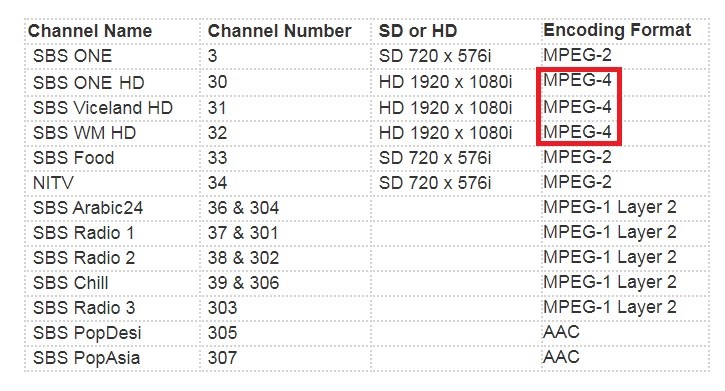
Standard definition SBS channels would still be viewable.  The table below shows all SBS channels and MPEG standard used as of July 2020.
To determine whether your TV is able to receive channels with an MPEG4 stream, go through the following checklist

1.  Perform an automatic channel scan, this has been shown in some isolated cases to work

2.  Check if your TV is able to receive any SBS channels at all including the SD channels, example SBS One (Channel 3).  If you cannot receive any SBS services, your problem is not related to MPEG4 compatibility.  If you can receive SD SBS channels, and cannot receive any of the HD channels 31-32, then MPEG4 compatibility is your issue

3.  Visit your TV manufacturers website and contact the support line with your TV model number to get confirmation.  Ask if a software update is available for your TV as certain models have software updates to enable MPEG4 compatibility

4. Google search your TV model number along with the word MPEG4, example – Samsung UA40H6400 MPEG4.  This may bring up search results that relate to your TV model and MPEG4 compatibility, such as on manufacturer websites, or discussion forums which can often contain helpful answers.

If it has been determined that your current TV set is not able to decode MPEG4, a digital set top box can be purchased allowing it to be used to receive both MPEG2 and MPEG4 channels and re-use your existing TV simply as a display.  If you currently are a subscriber of Foxtel using an IQ3 or IQ4 set top box, you can plug your coax cable from the TV antenna outlet into your Foxtel box which will be able to receive all channels, MPEG2 and MPEG4

Samsung OCB – One Connect Box and one clear cable

Cable clutter behind a TV wall mount installation has long been an issue both for the installer and the client.  Who would have thought you could combine it all into one.

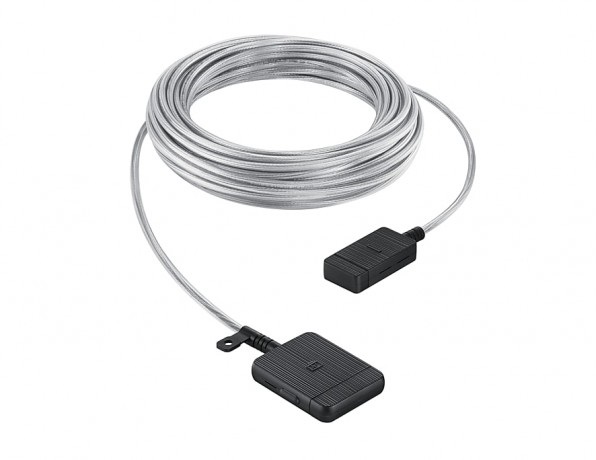
Samsung has released their One Connect Box, or OCB for short.  Utilizing Samsungs propriety “One Clear Cable” which carries all the required TV signals, power and HDMI signals with one thin slim wire.

You might be left with a lot of unanswered questions about this new technology, such as:

– What is the one connect box?
– How does the one clear cable work?
– Conduit size required for the One Clear Cable

What is the Samsung One Connect Box?

The Samsung One Connect Box (OCB) is a central receptacle for all the required signals and cables that normally need to be directly connected to the TV.
This device receives data, power and signals from all the devices normally connected to a TV, and transmits it through one small cable to your Samsung TV.
The inputs vary depending on which year model your OCB box is, however generally available is 240v power input, 4 HDMI inputs, two USB ports, TV antenna RF input,
and digital audio optical input (SPDIF).

What is the Samsung One Clear Cable?

The extremely thin One Clear Cable has a chipset inside each head, one end modulates all the signals from the OCB  into a data stream that is transmitted
within a fiber optic cable, an astounding capacity of upto 75 gigabits.  The same cable also carries power to the TV most likely via two separate cores.  The voltage used is unknown.
The cable is white in colour which allows it to blend into surrounding walls with a minimum visual impact on TV wall mounting installs

Conduit size required for the One Clear Cable

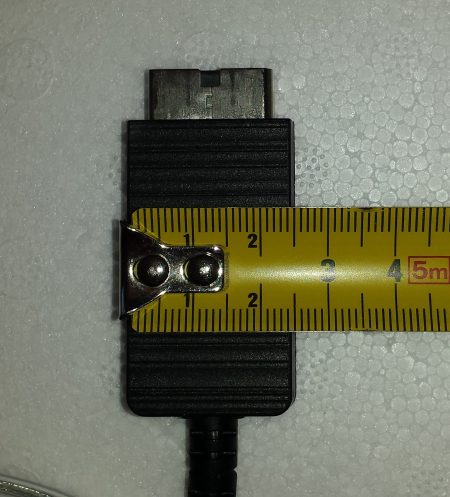
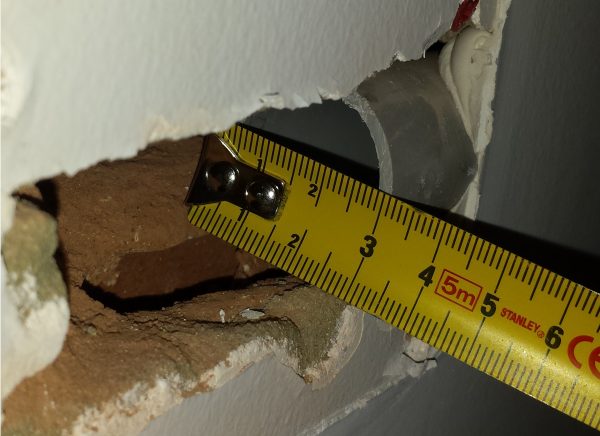
When doing many TV Wall Mounting jobs in Perth, I have found that the Samsung One Clear Cable often fails to fit through many conduits even after salesman or electricians have guaranteed the customer fitment during the sale of their build or consultation when buying their new TV.  Let’s take a look at the width of the cable head, its about 25mm in diameter.  The conduit we were presented with in this house was a 32mm conduit.  Keep in mind this refers to the outside diameter of the tube.  With the 2mm wall thickness on each side, gives an inside diameter of 28mm.

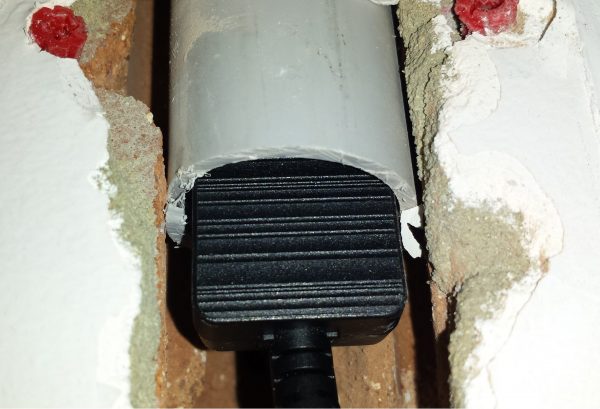
Given our measurements, a 25mm plug head should be expected to fit inside a 28mm internal diameter of the conduit.  It manages to go in leaving no gaps, then gets stuck.

The problem being is that the head has a thickness of about 13mm.  As the conduit internal diameter is only 28mm as it’s widest, and thinner away from the centre line, causing the edges of the plug housing to get stuck

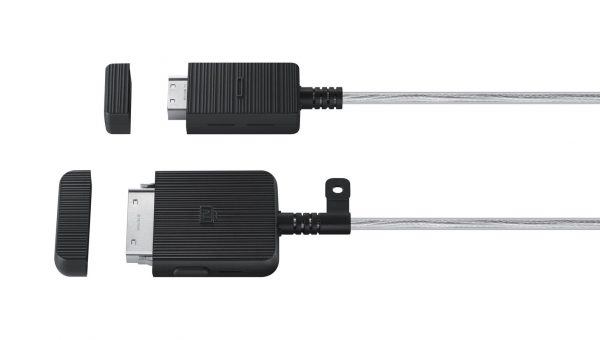
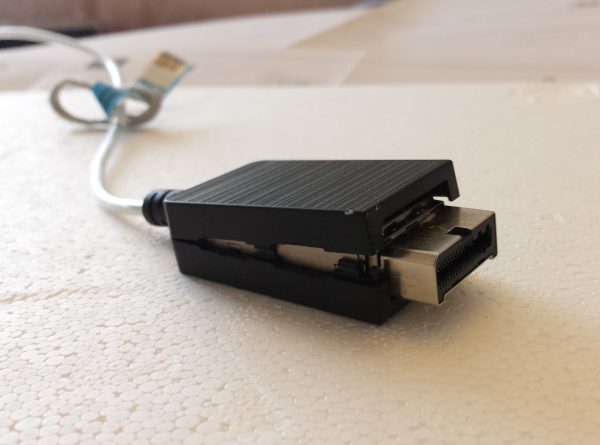
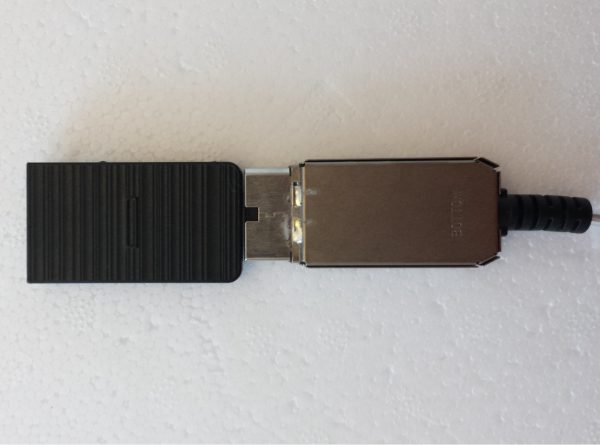
We notice this cable head has a plastic housing, which with a precision flat head screwdriver were able to gently pop open and remove, exposing the metal shielding that houses the internal chipset.  The removal of the plastic housing makes the cable head much smaller allowing it to now fit into the conduit with ease.  This conduit did have a corrugated bend, which should not be used unless absolutely necessary as the cable head can get stuck in the corrugations on tight bends.

We notice this cable head has a plastic housing, which with a precision flat head screwdriver were able to gently pop open and remove, exposing the metal shielding that houses the internal chipset.  The removal of the plastic housing makes the cable head much smaller allowing it to now fit into the conduit with ease.  This conduit did have a corrugated bend, which should not be used unless absolutely necessary as the cable head can get stuck in the corrugations on tight bends.